Forum › Forums › Freeview HD › FVP 4000T, 5000T › Two new boxes… different remotes
- This topic has 10 replies, 5 voices, and was last updated 8 years, 7 months ago by
grahamlthompson.
-
AuthorPosts
-
April 8, 2017 at 2:59 pm #18931
Anonymous
InactiveSo I finally bit the bullet and bought two of these. One for me and one for my 86 year old father in law. We’re both getting on OK but the guide is really frustrating and deleting old recording seems very tedious. DLNA is working fine on my box.
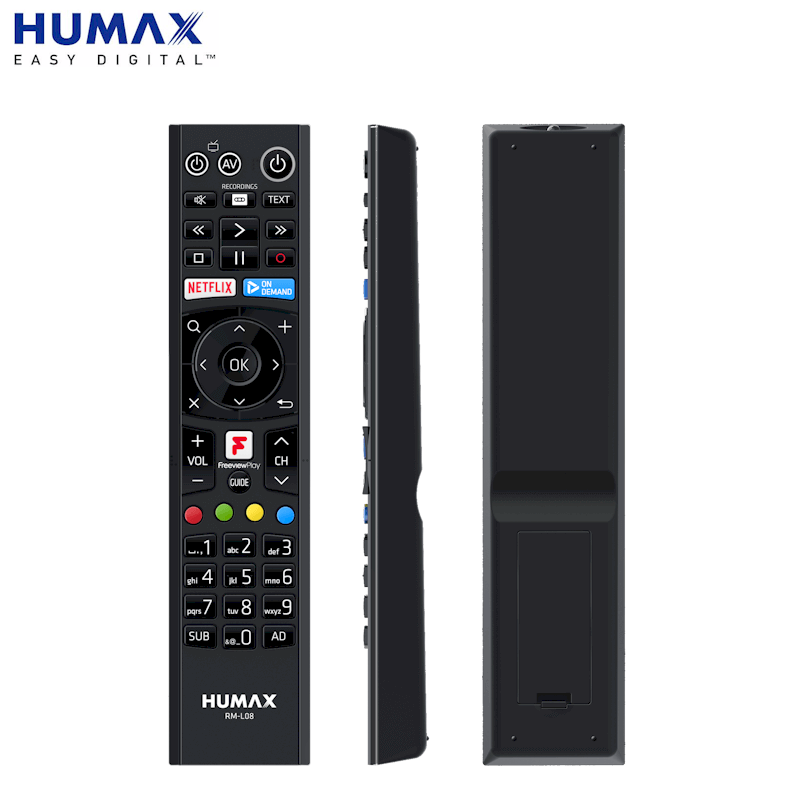
One oddity though. I bought the boxes about 3 weeks apart and they have different remotes. I haven’t had them side-by-side so I’m not sure whether there is anything different apart from the colouring (the second box has a light grey panel at the bottom)
Have we been palmed off with an older model for one of them? Should I worry?
April 8, 2017 at 3:07 pm #78467InactiveI’ve just been checking images on Google. This is mine (first box)
http://www.toobys.com/images/stories/virtuemart/product/Humax_remote_RM-L083.png
and this is his (3 weeks later)
http://www.gadgetlayman.com/_images/news/humax-fvp4000t-remote.jpg
I can see the Netflix button but that won’t ever be an issue for either of us. Is there any other difference I should worry about?
April 8, 2017 at 6:07 pm #78468Barry
ModeratorRM-L03 was the original remote, replaced with RM-L08. One of your units had been in stock at retail for a while, nothing to worry about.
April 10, 2017 at 7:05 am #78469InactiveI like the look of RM-L08… does that ‘Recordings’ button go straight to the list of recordings????? IF so that would help to cut out several key presses.
My original RM-L03 is pretty cheap and nasty and is already suffereing with crunchy arrow keys.
April 10, 2017 at 7:12 am #78470ModeratorCorrect – RM-L08 does indeed have one button access to recordings
April 10, 2017 at 7:13 am #78471InactiveGreat, think I will put that on the shopping list.
Thanks.
April 11, 2017 at 4:01 pm #78472InactiveThe new remote looks to have better function than the older one so my question is; can you tell what remote is in the retail box before deciding to buy and leaving the shop?
I won’t want to get home and find I had the old remote in the box and asking Mr John Lewis to open up a few boxes to check the remotes might upset him.
April 11, 2017 at 4:05 pm #78473grahamlthompson
ParticipantKayCS – 2 minutes ago »
The new remote looks to have better function than the older one so my question is; can you tell what remote is in the retail box before deciding to buy and leaving the shop?
I won’t want to get home and find I had the old remote in the box and asking Mr John Lewis to open up a few boxes to check the remotes might upset him.
I guess Humax would need to publish the serial numbers the new remote started at. I doubt they would do that

Perhaps buy online and use your right to return purchase.
April 12, 2017 at 10:52 am #78474InactiveThanks for that GLT.
Just noticed today looking at the Argos site that the photo’s they have of this unit has the RM-L08 in it so that settles that but just need to work out in my mind if I could live with this machine.
It’s the triple tuner I’m looking at so I can do away with the two PVR’s I have in my set up now.
April 14, 2017 at 9:32 am #78475InactiveWent out Wednesday and bought a 4000T and I think I found out how to tell if the box contains the latest generation or the older model.
On the box for the older model retailers have stuck a sticky tab on the box that says something like “Now with Netflix” but on the boxes with the current hardware it has a tab saying “NETFLIX Now Available” actually printed on the box.
So far loving the box and for me its lightening fast though when I first set it up it would not display anything on my TV but I found the supplied HDMI cable was naff but changing to an older better cable and I was good to go. I had the overload TV input problem with stuttering HD but tuning to another transmitter further away, so weaker signal, fixed that.
April 14, 2017 at 9:56 am #78476ParticipantKayCS – 22 minutes ago »
Went out Wednesday and bought a 4000T and I think I found out how to tell if the box contains the latest generation or the older model.
On the box for the older model retailers have stuck a sticky tab on the box that says something like “Now with Netflix” but on the boxes with the current hardware it has a tab saying “NETFLIX Now Available” actually printed on the box.
So far loving the box and for me its lightening fast though when I first set it up it would not display anything on my TV but I found the supplied HDMI cable was naff but changing to an older better cable and I was good to go. I had the overload TV input problem with stuttering HD but tuning to another transmitter further away, so weaker signal, fixed that.
Just fit a cheap variable attenuator.
-
AuthorPosts

- You must be logged in to reply to this topic.