Forum › Forums › Freesat HD › HDR 1000, 1010, 1100S › Hard disk upgrade – using WD20EURS 2tb
- This topic has 100 replies, 22 voices, and was last updated 7 years, 8 months ago by
Anonymous.
-
AuthorPosts
-
October 6, 2015 at 5:52 pm #39361
grahamlthompson
ParticipantThe fan is temperature controlled, it only runs when needed.
October 6, 2015 at 6:04 pm #39362Anonymous
InactiveI regret to say that the PC sees the partitions implies an PVR fault – software or hardware is hard to know.
Don’t format it at least yet – can you post details of what Windows thinks the 3 partitions are please.
October 6, 2015 at 6:37 pm #39363Inactivegrahamlthompson – 42 minutes ago »
The fan is temperature controlled, it only runs when needed.
Thanks
 I won’t go blowing the hairdryer at it to test it!
REPASSAC – 30 minutes ago »
I regret to say that the PC sees the partitions implies an PVR fault – software or hardware is hard to know.
Don’t format it at least yet – can you post details of what Windows thinks the 3 partitions are please.
Okay, thanks. As I say, I’ll test the replacement cable when it turns up to see if it’s that part, otherwise sadly I’m guessing it could be the motherboard. Here’s how the original disk looks in diskmgmt:
 October 6, 2015 at 6:51 pm #39364Inactive
please can you display the properties of each drive. Right click on the partition and select properties.
October 6, 2015 at 7:44 pm #39365InactiveREPASSAC – 46 minutes ago »
please can you display the properties of each drive. Right click on the partition and select properties.
Hi REPASSAC, thanks for your continuous support. Forgot to mention it’s Disk 1 (obviously lol). When I right-click the partitions, the ‘Properties’ option is greyed out, with the only options being ‘Delete Volume’ and ‘Help’. I ran the app again as Administrator and the ‘Properties’ option was still greyed out on all 3 partitions – not sure if this is usual behaviour (i.e. because it’s been locked down by manufacturer or something).
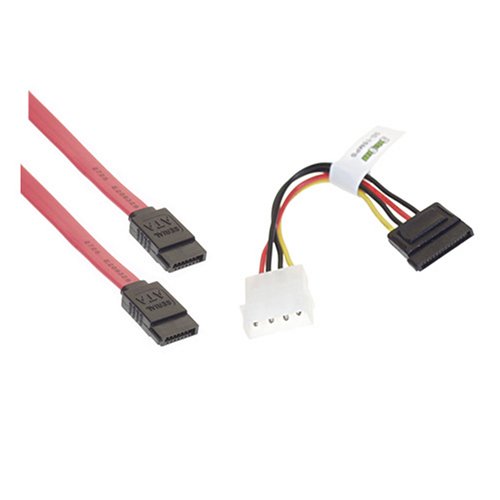
If that’s strange in your eyes, let me know. All the while, I’ll hold out hope that these little fellas rescue me:
 October 7, 2015 at 2:51 pm #39366Inactive
Not very surprised you can’t display the properties as it will not recognise the filing system. I thought it might display “unknown type nn”.
A previous poster (another thread I think) had indicated that he could even see the files on Windows 10 but I was very sceptical he was looking at the correct disk.
November 13, 2015 at 7:04 pm #39367InactiveHey guys, long time no see! (took forever for that part to arrive). I supplied power to a couple of hard-drives (including the original) and tried a couple of individual SATA cables (with a lot of turning off & on properly in-between) but it pains me to say the PVR still didn’t recognise any storage – me thinks the port on the motherboard has gone to heaven.
So now I come to you with a very simple question: Is it possible to record on USB storage? I plugged in a 2.5″ HDD using a caddy, and the PVR recognised it. The record button functions (as long as it’s not the current programme) in so much as it puts an (R) next to the listing but doesn’t actually record it, haha. However, as referenced above, I still have the original 3.5″ HDD. I read somewhere that these are a special designation of hard drives produced for devices like PVR’s. Before I go and buy a 3.5″ HDD USB caddy (with power input) to play with, I just wanted confirmation that using an external USB storage disk to record on is even an option.
At this rate, it looks like I’ll be selling for parts or free-cycling but I didn’t want to give up just yet. I really appreciate this forum in my quest though! Thanks again.
November 13, 2015 at 7:14 pm #39368ParticipantBradster – 5 minutes ago »
Hey guys, long time no see! (took forever for that part to arrive). I supplied power to a couple of hard-drives (including the original) and tried a couple of individual SATA cables (with a lot of turning off & on properly in-between) but it pains me to say the PVR still didn’t recognise any storage – me thinks the port on the motherboard has gone to heaven.
So now I come to you with a very simple question: Is it possible to record on USB storage? I plugged in a 2.5″ HDD using a caddy, and the PVR recognised it. The record button functions (as long as it’s not the current programme) in so much as it puts an (R) next to the listing but doesn’t actually record it, haha. However, as referenced above, I still have the original 3.5″ HDD. I read somewhere that these are a special designation of hard drives produced for devices like PVR’s. Before I go and buy a 3.5″ HDD USB caddy (with power input) to play with, I just wanted confirmation that using an external USB storage disk to record on is even an option.
At this rate, it looks like I’ll be selling for parts or free-cycling but I didn’t want to give up just yet. I really appreciate this forum in my quest though! Thanks again.
Pretty sure, you cannot record to a usb device on the HDR models only the HB1000S. There appears to be some sort of code in the software that indicates you may be able to (perhaps intended for the HB1000S and it gets invoked when the internal hard disk can’t be found). Simple answer is try it with a usb hard drive if you have one. AV specced drives are only required for reliable long term recording and time shifting. Any drive should suffice to confirm this.
August 8, 2016 at 3:54 pm #39369InactiveHi, can the WD20EURS 2tb be used to upgrade the HDR 1100S 500GB?
Thanks
August 8, 2016 at 4:31 pm #39370Participantnssvn – 36 minutes ago »
Hi, can the WD20EURS 2tb be used to upgrade the HDR 1100S 500GB?
Thanks
As the Humax G2 boxes share the same software, the answer is almost certainly yes.
August 8, 2016 at 5:03 pm #39371Inactivegrahamlthompson – 27 minutes ago »
nssvn – 36 minutes ago »
Hi, can the WD20EURS 2tb be used to upgrade the HDR 1100S 500GB?
Thanks
As the Humax G2 boxes share the same software, the answer is almost certainly yes.
Great thanks, successfully upgraded my 1000s using this thread. Any pros/cons on the newer 1100S and benefit to update?
Thanks
August 9, 2016 at 12:00 pm #39372InactiveI would not expect the pro’s and cons to be any different from the other HDR-1xx0S models, However, given the smaller footprint, I would advise taking a look inside the unit and checking the drive type and size as I don’t recall seeing details before.
August 9, 2016 at 12:22 pm #39373InactiveREPASSAC – 20 minutes ago »
I would not expect the pro’s and cons to be any different from the other HDR-1xx0S models, However, given the smaller footprint, I would advise taking a look inside the unit and checking the drive type and size as I don’t recall seeing details before.
Unfortunately don’t have one to check against…yet! Thanks
January 3, 2017 at 6:37 pm #39374InactiveSo i have had a hard drive fail on me and wanted to know what hard drive would be best to replace it with?!
Would this be ok? https://www.amazon.co.uk/d/Internal-Hard-Drives/1TB-Desktop-SATA-Hard-Drive/B006GDVREI/ref=sr_1_1?s=computers&ie=UTF8&qid=1483467601&sr=1-1&keywords=wd+1tb+green
Thank you for any kind of help.
January 3, 2017 at 6:45 pm #39375InactiveHi, the model you’re looking at is the EZRX, not the EURS as discussed on the thread so can’t comment on suitability I’m afraid, possibly others can advise.
-
AuthorPosts
- You must be logged in to reply to this topic.