Forum › Forums › Freeview HD › Aura UHD › Dolby Atmos/Dolby Digital plus – how to get?
- This topic has 76 replies, 2 voices, and was last updated 4 years ago by
Anonymous.
-
AuthorPosts
-
November 3, 2021 at 1:01 pm #107721
Anonymous
InactiveThis would suggest that Humax don’t have access to a Sonos to do any testing themselves (otherwise they would be advising you on the settings). So why not ask them to send the replacement for you to test and if the new one works (which it probably won’t) then keep it and return your old box?
November 3, 2021 at 1:06 pm #107722InactiveIf it was a big issue I’d pursue this further. I’d like to know if anyone has any type of audio equipment that does Dolby Atmos (doesn’t have to be Sonos I suppose) and if they get Dolby atmos from the aura and which audio setting are they using.
November 3, 2021 at 1:07 pm #107723InactiveAnd I still think that you should have a look at the hdmi output settings inside the Android operating system.
My high end Android media box needs to be set on RAW so that the unprocessed signal can then be correctly decoded by my AV system. You won’t be breaking anything by changing this output.
November 3, 2021 at 1:09 pm #107724Inactiveboogersa – 1 min ago »
If it was a big issue I’d pursue this further. I’d like to know if anyone has any type of audio equipment that does Dolby Atmos (doesn’t have to be Sonos I suppose) and if they get Dolby atmos from the aura and which audio setting are they using.
Probably more chance of that by joining the Sonos Community forum and asking there.
November 3, 2021 at 1:17 pm #107725InactiveHave you seen this post from Barry a while ago?
“Some comments from programmer I have been asked to post:
• Dolby TrueHD passthrough
At the moment it is not supported by SoC(System-On-Chip) we used for Aura.
We have been confirmed that Dolby TrueHD will be supported in next Android version.
• Dolby Atmos
There are two types of Dolby Atmos : Atmos with DDP & Atmos with Dolby TrueHD.
*) Atmos with DDP : Currently supported. e.g.) Prime video Jack Ryan.
But Disney+ App supports Atmos only with Android 10(Q).
*) Atmos with Dolby TrueHD : will be supported from next Android version.
The next android major update is scheduled for later this year.”
November 3, 2021 at 1:37 pm #107726InactiveOk thanks for the info. I am getting Dolby atmos (via DD+) on Amazon prime and BT sport but only if my audio output in the Aura is set to ‘Home Cinema via hdmi (aura – audio equipment- tv) but that’s not exactly my setup which is Aura – Tv – Sonos but seems to work but stops me getting Dolby digital plus from Aura when watching Dolby digital plus content, e.g. match of the day BBC 1 hd – you just get stereo pcm.
November 4, 2021 at 9:47 am #107727InactiveIn a previous reply you said that “Digital sound out” was only giving you 2 options, that doesn’t seem correct.
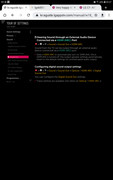
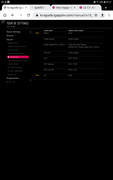
You must be on the arc option on the TV first before accessing the settings.
November 4, 2021 at 10:08 am #107728InactiveI only have 2 options from Digital Sound out and they are 1)pcm 2) auto.
November 4, 2021 at 10:41 am #107729InactiveSorry, I was misunderstanding the interactive guide that I gave screenshots for (and thinking that the additional options listed were individually selectable).
So is your TV set to auto?
November 4, 2021 at 10:45 am #107730InactiveYes, set to auto.
November 4, 2021 at 10:52 am #107731InactiveHave you tried toggling to pcm?
And made sure that Simplink is active?
November 4, 2021 at 11:20 am #107732InactiveWhy? All you get is pcm stereo. I would lose Dolby atmos to my Sonos beam via the apps on my lg tv.
November 4, 2021 at 12:51 pm #107733InactiveIt can’t hurt to try.
Plus, pcm isn’t only stereo.
When I upgraded my older LG oled to my current one, I couldn’t get arc audio to work, no matter what settings I tried on my AV system. I became convinced that I had inadvertently plugged my TV into the wrong input on the amp and gave up (because I couldn’t be bothered moving the furniture etc just to get to the back). When you started this thread, it piqued my interest and I started trying to figure my own issues out. I moved everything and discovered that I had plugged everything correctly into the right ports but still nothing. I then started looking at absolutely every setting and option on the TV, many of which only become available (not greyed out) after either putting the TV into “live TV” and turning off eARC (or ARC) and then selecting the hdmi port. That’s when I found that all my hdmi ports were defaulted to Bitstream. When I changed to PCM and then turned ARC back on, everything worked as it should. Everything switches on together and audio is routed through amp correctly (swapping inputs automatically). Then I swapped back to Bitstream to see what happened. Now, and I much prefer it this way, when I turn on the TV it no longer automatically turns on the amplifier (which in the daytime I don’t use) but when it is on, audio is still correctly routed through arc.
It wasn’t and would not work until I toggled the pcm/Bitstream setting so I can only assume that toggling the setting triggered something internally, who knows? All I know is that it now works and that the LG menu system is a pain in the backside (because it would make more sense to be able to access all of the settings all of the time.
November 4, 2021 at 1:15 pm #107734InactiveI think you’re comparing apples with oranges. My tv although an LG too has different settings to yours. I don’t have the option to set specific hdmi output. I don’t have a bitstream option. I did set to pcm and as I thought, Netflix output the audio in pcm stereo when it was previously Dolby Atmos when set to auto. I have no other options to try. Strange though that to get Dolby Atmos via sound bar Arc connection I have to have the switch for Dolby Atmos set to on for the internal speakers. If the internal speakers have Dolby atmos off I do not get Dolby Atmos via the soundbar. But I think that’s a quirk with the Netflix app on my tv.
November 4, 2021 at 1:40 pm #107735InactiveThe only point I am trying to make is don’t just assume that changing a particular setting is pointless until you have tried it.
I have set up hundreds and hundreds of customers kit (in my previous career) and it never ceased to amaze me how confusing some manufacturers make it to set things up. And I have been sent out to 100s and 100s more where something “wasn’t working” and it was user error. It is what it is.
As I said in my earlier post, I started second guessing myself about my own setup because it just wouldn’t work. But everything was plugged in where it was supposed to be after all. And now it is working, just by toggling one setting that I hadn’t noticed because it was greyed out when accessing the settings one way but not the other.
-
AuthorPosts
- You must be logged in to reply to this topic.