Forum › Forums › Freesat HD › HDR 1000, 1010, 1100S › Hard disk upgrade – using WD20EURS 2tb
- This topic has 100 replies, 22 voices, and was last updated 7 years, 8 months ago by
Anonymous.
-
AuthorPosts
-
January 4, 2014 at 11:18 am #39331
Anonymous
InactiveJuly 18, 2014 at 12:59 am #39332InactiveThere is a way to get round the breaking of the seal (if it’s the same as the foxsat) and that’s to heat it with a hair dryer to make the glue underneath become warm and it’s a doddle to remove with something like a scalpel, of course this is presumeing it’s like the foxsat as i say.
All1
August 7, 2015 at 5:32 am #39333InactiveREPASSAC – 2 years ago »
Started with Unit in standby, firstly disconnected power then waited 1 min for capacitors to discharge.
Removed the rear case screw and the 4 screws hidden under the feet – I removed the feet pads with a watchmakers screwdriver – they are self adhesive and can be refitted later. Removed the lid.
With magnetised screwdriver removed the 4 screws holding the disk caddy.
Lifted caddy and removed combined power/sata connector.
Removed the caddy, unscrewed the 4 side screws.
Removed disk (You may need to push the disk out carefully as it is quite snug) I used a screwdriver and was careful to only contact the enclosed part of the drive.
Inserted WD20EURS and refitted everything.
Reconnected power and waiting for the unit to recover from power failure. Booted unit.
Unit started on last channel viewed – 20 Secs or so later an on screen message that HD is not formatted. Press OK to go to HD format. Selected OK then Selected “Next” to format.
The formatting message displayed for about 3 mins.
Following that all good to go. A Very simple upgrade – no nearby components to worry about unlike the Foxsat.
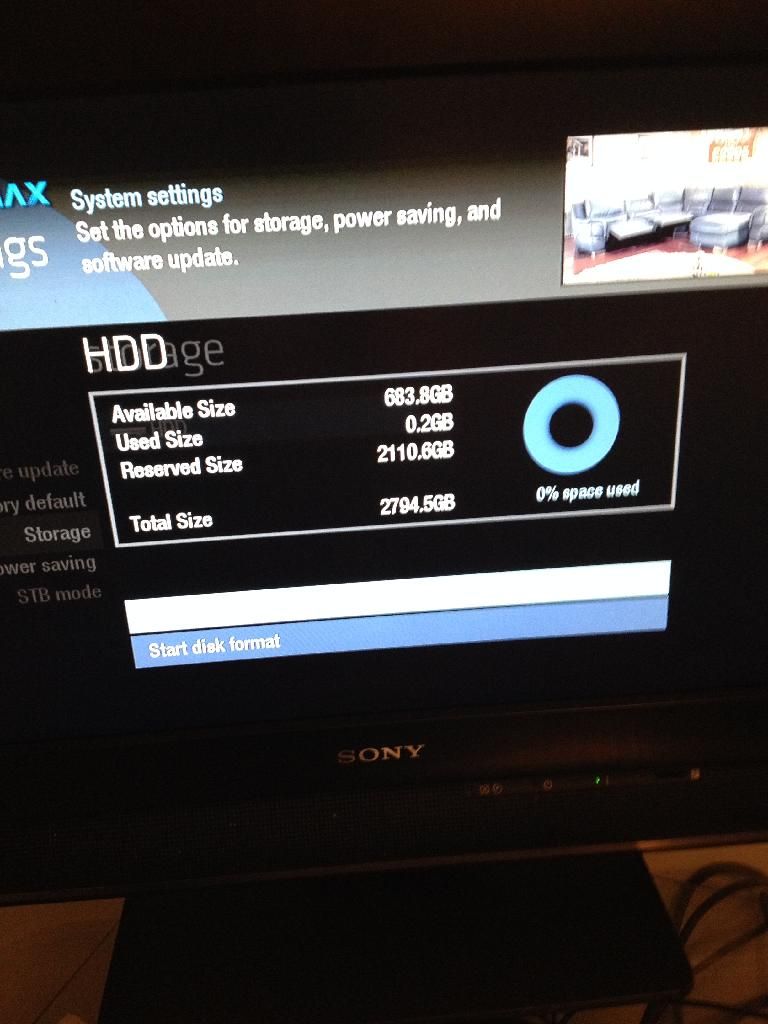
Out of my 2tb:
Free 1690.2
Used: 92.8
Res. 80.1
Total 1863.0
One point to note: It was not possible to access my previous recordings. I tried by mounting the drive in a USB enclosure. It was however possible to access the Videos, Music and Pictures.
Upgraded first box to 2TB last night, simples and successful! Thanks for the excellent ‘how to’ guide, had to buy HDD WD20EURS from ebay USA to get a decent price, second hand/refurbished! Guessing this model is now a discontinued model and wasn’t sure of the current equivalent, anyone any ideas!?
August 7, 2015 at 9:25 am #39334grahamlthompson
ParticipantOnly the WD SATA 3 designs now seem to available (WD30EURS).
http://www.wdc.com/wdproducts/library/SpecSheet/ENG/2879-701250.pdf
Adding a jumper to pins 5 and 6 reduces the drive speed to sata 2 so hopefully this will work. A poster is fitting this drive in another thread so should no for certain fairly soon.
August 7, 2015 at 11:52 am #39335Inactivegrahamlthompson – 2 hours ago »
Only the WD SATA 3 designs now seem to available (WD30EURS).
http://www.wdc.com/wdproducts/library/SpecSheet/ENG/2879-701250.pdf
Adding a jumper to pins 5 and 6 reduces the drive speed to sata 2 so hopefully this will work. A poster is fitting this drive in another thread so should no for certain fairly soon.
Thanks Graham, think the WD30EURS is the 3TB version of the same unit and sure I read somewhere that the HDR1000 max’s out at 2TB!
August 7, 2015 at 12:31 pm #39336Martin Liddle
Participantnssvn – 37 minutes ago »
think the WD30EURS is the 3TB version of the same unit and sure I read somewhere that the HDR1000 max’s out at 2TB!
True but the data sheet also covers WD20EURS 2TB and smaller capacity drives.
August 7, 2015 at 4:19 pm #39337InactiveAre jumpers necessary to limit the transfer speed? I thought that SATA 3 drives were designed to be backwards-compatible with previous standards and auto-negotiate the speed with host?
An issue you might encounter with a 3TB drive relates to the partition table. Up to 2TB are compatible with the older MBR tables; 3TB and above need GUID partition tables. If your kernel and/ or software do not have GUID support you will not be able to use the full capacity of the drive if it is larger than 2TB.
August 7, 2015 at 6:25 pm #39338InactiveMontysEvilTwin – 2 hours ago »
Are jumpers necessary to limit the transfer speed? I thought that SATA 3 drives were designed to be backwards-compatible with previous standards and auto-negotiate the speed with host?
An issue you might encounter with a 3TB drive relates to the partition table. Up to 2TB are compatible with the older MBR tables; 3TB and above need GUID partition tables. If your kernel and/ or software do not have GUID support you will not be able to use the full capacity of the drive if it is larger than 2TB.
I don’t think we know – WD has documentation on what to do to slow down the speed but I think we don’t really know if this is necessary or not. Jumpers are two a penny (or less). It needs a long term tester (especially with the 6 GB/s units)
August 9, 2015 at 12:04 pm #39339InactiveMontysEvilTwin – 1 day ago »
Are jumpers necessary to limit the transfer speed? I thought that SATA 3 drives were designed to be backwards-compatible with previous standards and auto-negotiate the speed with host?
An issue you might encounter with a 3TB drive relates to the partition table. Up to 2TB are compatible with the older MBR tables; 3TB and above need GUID partition tables. If your kernel and/ or software do not have GUID support you will not be able to use the full capacity of the drive if it is larger than 2TB.
Think you’re correct MET (partition issue)! Is there any way to find out which partition table is used on a particular 1000 box and would this have changed with development of the box over the years!?
August 9, 2015 at 1:02 pm #39340Inactivenssvn – 53 minutes ago »
MontysEvilTwin – 1 day ago »
Are jumpers necessary to limit the transfer speed? I thought that SATA 3 drives were designed to be backwards-compatible with previous standards and auto-negotiate the speed with host?
An issue you might encounter with a 3TB drive relates to the partition table. Up to 2TB are compatible with the older MBR tables; 3TB and above need GUID partition tables. If your kernel and/ or software do not have GUID support you will not be able to use the full capacity of the drive if it is larger than 2TB.
Think you’re correct MET (partition issue)! Is there any way to find out which partition table is used on a particular 1000 box and would this have changed with development of the box over the years!?
If you use a USB caddy to connect the drive to a Windows PC you should be able to use the disk management tool to find out. Look here for instructions.
August 9, 2015 at 1:18 pm #39341ParticipantMontysEvilTwin – 14 minutes ago »
nssvn – 53 minutes ago »
MontysEvilTwin – 1 day ago »
Are jumpers necessary to limit the transfer speed? I thought that SATA 3 drives were designed to be backwards-compatible with previous standards and auto-negotiate the speed with host?
An issue you might encounter with a 3TB drive relates to the partition table. Up to 2TB are compatible with the older MBR tables; 3TB and above need GUID partition tables. If your kernel and/ or software do not have GUID support you will not be able to use the full capacity of the drive if it is larger than 2TB.
Think you’re correct MET (partition issue)! Is there any way to find out which partition table is used on a particular 1000 box and would this have changed with development of the box over the years!?
If you use a USB caddy to connect the drive to a Windows PC you should be able to use the disk management tool to find out. Look here for instructions.
The recording partition on a freetime box is Luks encrypted, you cannot easily access it on a PC.
October 3, 2015 at 5:12 pm #39342InactiveI believe this tool addresses that problem:
http://e2fsprogs.sourceforge.net/ext2.html
Looks all very odd and amateur but helped me out of a huge NAS problem. It enables copying of data into Linux environments but from a windows console. There are a few similar tools available but this one I have used whilst far from initially intuitive, it does work extremely well.
Just to ask (have read the thread) has anyone broke the 2TB ceiling yet?
Also has anyone managed to fit an SSD into any Humax box but ideally the HDS 1100S?
October 3, 2015 at 5:40 pm #39343Inactiveatacama40 – 24 minutes ago »
I believe this tool addresses that problem:
http://e2fsprogs.sourceforge.net/ext2.html
Looks all very odd and amateur but helped me out of a huge NAS problem. It enables copying of data into Linux environments but from a windows console. There are a few similar tools available but this one I have used whilst far from initially intuitive, it does work extremely well.
Just to ask (have read the thread) has anyone broke the 2TB ceiling yet?
Also has anyone managed to fit an SSD into any Humax box but ideally the HDS 1100S?
I don’t think so – even if they have expanded that oldish tool – what key would you supply? It does work well with EXT3 paritions however.
The 2 TB ceiling was only by desire – nobody has yet seen the need
to try.
October 3, 2015 at 6:12 pm #39344ParticipantSSD drives aren’t generally considered suitable for PVR use.
1 There’s no speed advantage, a standard AV drive is more than fast enough
2 The Time Shift Buffer file is continously being overwritten all the time the pvr is on, so is likely to cause issues much sooner than a conventional hard disk.
Is there a 3TB SSD available, and if so at what price ?
October 3, 2015 at 6:54 pm #39345Participantgrahamlthompson – 35 minutes ago »
2 The Time Shift Buffer file is continously being overwritten all the time the pvr is on, so is likely to cause issues much sooner than a conventional hard disk.
Do you have any figures to back up that assertion? This article http://techreport.com/review/27436/the-ssd-endurance-experiment-two-freaking-petabytes suggests a 256GB drive will have a life time write capability of more than 500TB of data.
-
AuthorPosts
- You must be logged in to reply to this topic.