Forum › Forums › Freeview HD › HDR 1800T, 2000T › Hooking an old DVD/VCR via HDR-2000T
- This topic has 11 replies, 4 voices, and was last updated 8 years, 11 months ago by
grahamlthompson.
-
AuthorPosts
-
December 16, 2016 at 4:47 pm #18642
Anonymous
InactiveHi All,
A new member question: I used to have a PVR-9150T where my set-up was a DVD/VCR combo feeding into the PVR, and then through to the TV, all using SCART.
I’ve just upgraded to a HDR-2000T and a new TV, an LG – 49UH620V Smart 4k Ultra HD HDR, and I’m struggling to work out how to hook the whole she-bang up.
The salesman at Curry’s told me it would be OK because the HDR has a SCART socket on the rear, but it seems that the SCART is an output, not an input (it’s labelled TV SCART).
All I want to do with the DVD/VCR is watch them, nothing fancy. Any thoughts on how to wire it all up?
If its any help, the DVD/VCR has SCART only, and my TV is an LG – 49UH620V Smart 4k Ultra HD HDR
December 16, 2016 at 6:01 pm #76141grahamlthompson
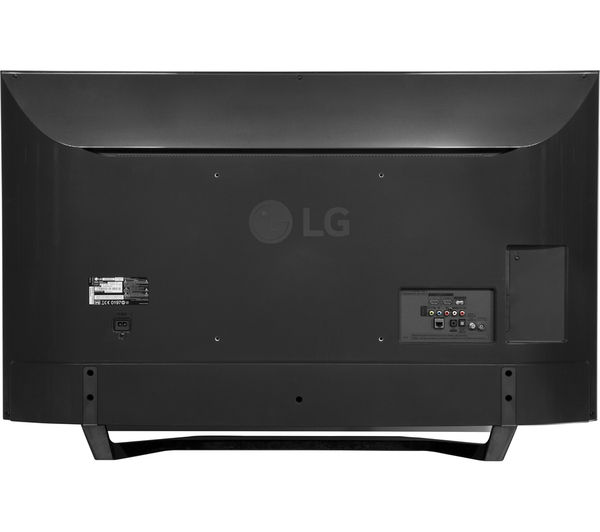
ParticipantAccording to the spec this TV has a composite video input (often on a supplied adaptor that looks similar to a HDMI socket or a small mini socket like a headphone socket. In addition you need a stereo audio input. You can get these from DVD player scart output using a simple adaptor.
The LG manual is about as useful as a bog roll
 On second thoughts less useful
Some photos of the inputs and supplied accessories would help to identify what cables you need.
Alternatively convert the scart output to HDMI and use a second HDMI input on the TV.
December 16, 2016 at 8:16 pm #76142InactiveThanks for the advice Graham. My fallback position is probably your last suggestion, use a SCART/HDMI cable to hook directly to the TV.
My question really was can I achieve this via the HDR-2000T as I used to do with my last PVR?
December 16, 2016 at 8:38 pm #76143Participantmickb – 17 minutes ago »
Thanks for the advice Graham. My fallback position is probably your last suggestion, use a SCART/HDMI cable to hook directly to the TV.
My question really was can I achieve this via the HDR-2000T as I used to do with my last PVR?
No as you already posted the newer box only has a single scart (output only) there are no analogue inputs you can loop through. The older HDR-FOX-T2 has a scart input and output. To use it you would need to connect it by a hdmi lead and a scart lead to the TV. There is no way the box can convert an analogue input to digital and output on HDMI. You would need a advanced AV receiver to do that.
You can’t use a cable to convert analogue to digital. It requires a powered box with a analogue to digital converter and a real time mpeg compressor.
December 16, 2016 at 9:09 pm #76144InactiveHi Mickb,
Why cant you just connect the Humax 2000T to the HDMI to your TV and connect your DVD/VHS recorder to the scart of your TV, then all you would have to do is just switch inputs on your TV. If your TV don’t have a scart input, then it will have a RCA input (red/white and yellow inputs). Then all you need is a lead with a scart plug one end and a RCA plugs the other end, that’s what I have used.
December 16, 2016 at 9:49 pm #76145Participantbill63 – 34 minutes ago »
Hi Mickb,
Why cant you just connect the Humax 2000T to the HDMI to your TV and connect your DVD/VHS recorder to the scart of your TV, then all you would have to do is just switch inputs on your TV. If your TV don’t have a scart input, then it will have a RCA input (red/white and yellow inputs). Then all you need is a lead with a scart plug one end and a RCA plugs the other end, that’s what I have used.
The newer TV’s do not have an obvious analogue input (scart socket) as I posted before. They don’t have the traditional sockets as they are so impossibly thin they use non standard sockets and provide a special socket which doubles for different analogue standards. Commonly composite video and component video. Only one of which can be used at any one time as they don’t have seperate connections. That is why I asked for a photograph of the actual sockets on the TV, there won’t be the familiar Yellow (CVBS) and Red/White stereo RCA Phono sockets.
December 16, 2016 at 9:57 pm #76146ParticipantThere is another possible answer assuming the TV tuner has analogue tuning capability (which is likely). You could connect the DVD scart output to a UHF modulator and loop the aerial to the TV via the modulator. This will add a PAL analogue channel to the digital channels from your aerial (It’s possible your DVD/VCR has such a device built in). Tuning your TV to this analogue channel will let you view the device. In the same way as vcrs let you view on TV’s with no scart sockets.
December 16, 2016 at 10:51 pm #76147Inactivegrahamlthompson – 56 minutes ago »
That is why I asked for a photograph of the actual sockets on the TV, there won’t be the familiar Yellow (CVBS) and Red/White stereo RCA Phono sockets.
A Dixons photo make sit look as though it does.
http://brain-images.cdn.dixons.com/2/7/10144772/l_10144772_005.jpg
There are close-ups avaialable of the 610 which appear to match the Dixons photo.
http://i.ebayimg.com/00/s/MTAwNlgxNTAw/z/UbQAAOSwCGVX8s5d/$_3.JPG
@mickb, could you confirm that these photos match what you have on your new TV?
December 16, 2016 at 11:04 pm #76148ParticipantLuke – 10 minutes ago »
grahamlthompson – 56 minutes ago »
That is why I asked for a photograph of the actual sockets on the TV, there won’t be the familiar Yellow (CVBS) and Red/White stereo RCA Phono sockets.
A Dixons photo make sit look as though it does.
http://brain-images.cdn.dixons.com/2/7/10144772/l_10144772_005.jpg
There are close-ups avaialable of the 610 which appear to match the Dixons photo.
http://i.ebayimg.com/00/s/MTAwNlgxNTAw/z/UbQAAOSwCGVX8s5d/$_3.JPG
@mickb, could you confirm that these photos match what you have on your new TV?
Some of the new TV’s have composite and component on a 3.5mm coaxial socket. Why the makers own website manuals lack this sort of basic info is pretty stupid. If that’s like the OP’s TV, the left hand socket is clearly the Yellow CVBS and the Red/White the audio. Only two HDMI in seems rather restrictive on a 4K TV.
December 17, 2016 at 10:09 am #76149InactiveAll,
What great responses – thanks. I’ve attached a photo of the ports on the back of the TV and I think it’s the same as posted above by Graham.
I’ve also ordered a SCART to HDMI Upscaler Video Audio Converter (https://www.amazon.co.uk/gp/product/B0181RCJTS/ref=oh_aui_detailpage_o00_s00?ie=UTF8&psc=1) which I hope will do the trick
Thanks
December 17, 2016 at 10:14 am #76150InactiveThe file was too large to be allowed so I've compressed it and submitted t again here
Cheers
[attachment=54814,774]
December 17, 2016 at 10:36 am #76151ParticipantYou don’t need the converter. Just the scart adaptor
and a RCA Phono Cable
The yellow goes into the left hand socket and the red/white into the red and white sockts.
-
AuthorPosts

- You must be logged in to reply to this topic.